This post is a wiki, feel free to add on, update, or remove content
Many other, in-depth guides are linked. This post is to give a basic overview to everything zombies related.
Expanding greatly on and updating A General Guide to Zombie Survival, as well as serving as an all in one place for other guides relating to the zombies gamemode.
This is a full guide for navigating the zombies gamemode.
What is Zombies?
Currently the only functioning gamemode, "Zombies Survival", usually just shortened to "Zombies", is a gamemode inspired by Call of Duty zombies. The gameplay summarized is as follows
- Enter a random map
- Select a custom premade class
- Upgrade weapons, armor, hp, and mana with points earned by hitting zombies
- Fend off waves of zombies that progressively get stronger
Getting started
Entering the gamemode
- When you join the server, go right into the
gamemodesportal
- Go down to the
zombiesportal
- Go into the
standardportal
- You should now be in queue
- Once you finish the queue, you should be in intermission or directly in a zombies match.
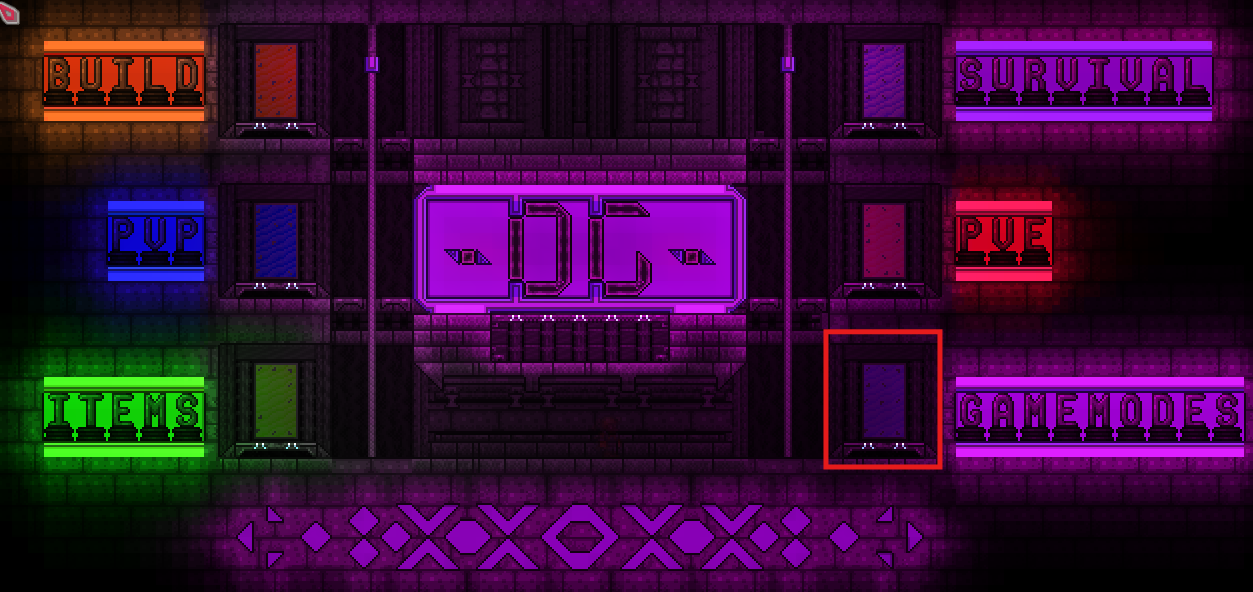
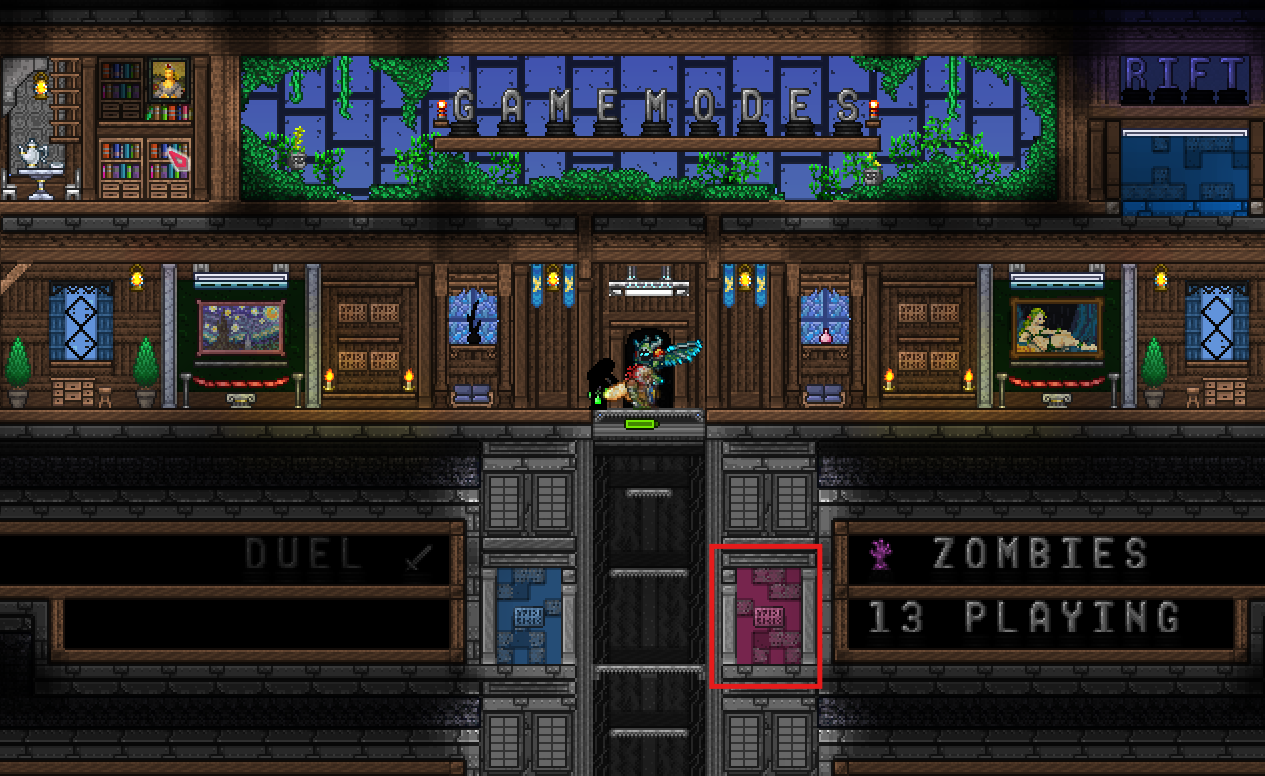
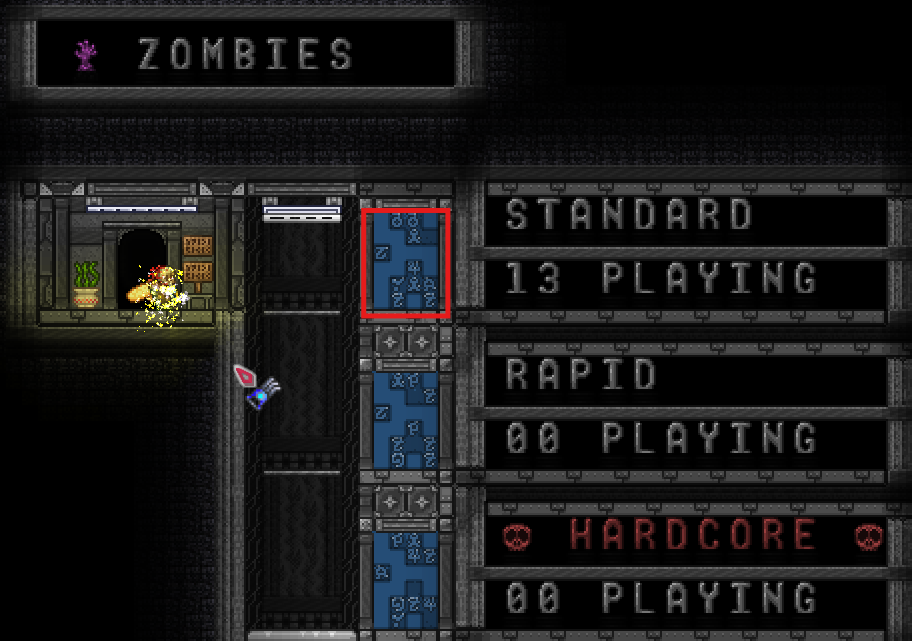
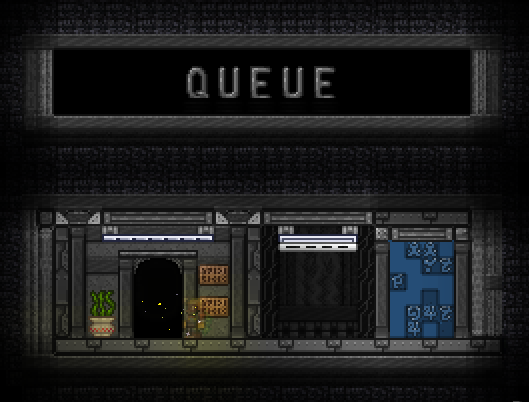
Queue not finishing even after a minute or two? The server might be struggling, check with others on Discord or say
/inlin chat and see if any lobbies are running(no lobbies = the servers are probably kaploot)
General gameplay
- You will spawn in with nothing in your inventory. Don’t worry, leaving will restore everything you originally had.
- Look for dark blue chests first, they will allow you to choose a class.

- By “opening” the chest, you can select a class. By “opening” other chests, you can purchase items.
- Once you have selected a class, all other chests will display text showing items, followed by their cost.
- These items can be bought with score, which you get from attacking enemies. Score is generated per hit, not by damage, so low damage weapons will give you the most score overtime.
- Once all the zombies are killed, or most of them are killed, the next wave will spawn. Overtime, the enemies will change, from zombies to possessed armor, all the way to paladins. Keep in mind they generally change every 3 rounds.
- The goal of the game is simply to survive as long as possible. Technically, the content no longer changes after round 22, with round 20 being the final boss and viewed as clearing the map.
Navigating the UI
Sadly, mobile has no UI due to restrictions. To view your score as a mobile player, say /score in chat.
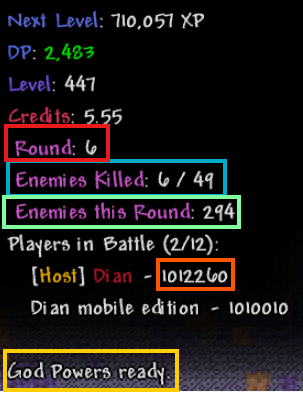
- Red = Current round number
- Blue= Enemies killed in the current wave
- Green = Enemies in total for the round
- Orange = Your score
- Yellow = Your ability (see
Advancing on>Abilities) - The text above the red is information about dtp
Exiting a game
- The game will end when everyone dies, and another map will be selected.
- If you specifically want to leave, type
/leaveor/riftin chat.- Your score(including purchased items) will automatically distribute to any remaining players.
Navigating the map
There are far too many maps to go over in detail, but here is a general guide
- Dark blue chests allow you to choose your class
- Red chests allow you to buy hp

- Blue chests allow you to buy mana

- Graves generally indicate mob spawns
- Small effects like “grrr” and dark harvest particles will indicate mobs spawn soon

- Normal chests allow you to buy weapons, armor, or accessories. Map creators often like hiding secrets, so look around! (especially for hidden switches)
Click here for the full list of maps
- Beach House v2
- Bio Clusters
- CandyLand
- Chaidou Woods
- Delivery
- Demonic Golf Club
- Distant Windmill
- Fiery Crags
- Forgotten Tomb
- Fungal Fields
- Glass Castle
- Groesten Haus
- Gun Caverns
- Inferno Battlefield
- Infinity Fortress
- Laboratory of Madness
- Lunar Mineshafts
- Miner’s Duplicity
- Mystic Library
- Normal Day
- Pirate Harbour
- Ruina
- Shadow Requiem
- Skelotens
- Snowyville
- The Battle of Trafalgar
- The Duality
- The Fall of Mystic Library
- Unholy Affliction
- Untimely Exploration
- Wrong Dimension
- Beach House
- bewitched
- Catacombs
- Cosmic Collapse
- Crimson Veins
- Cryptic Castle
- Crystal Caverns
- Cyber Complex
- Dark Shadows
- Death House
- Devil’s Reservoir
- Evergrowth
- Hell Storage
- Hill House
- Magmatic Depths
- Miner’s Deceit
- Monster Mansion
- Shadow’s Descent
- Shadow’s Realm of Death
- The Ascension
- The Beast
- Topaz Mall
- Winter’s Scream
For more map specific information, see here:
Spoiler Warning
Zombies Maps Overview
Dealing with death
What happens if I die?
- You will be placed in intermission and lose half your score- this score goes to the person who revives you.
- Simply wait until someone revives you. As they revive you, there will be text showing their progress. If they leave the area where you died, the revive gets canceled.
On the chance the round ends before someone revives you, you will be automatically revived and score will be taken from the person who delivered the final blow, as well as a bit from every other living player. No round bonus will be rewarded, and no bank sentry interest will be given as punishment.
What happens when someone else dies?
-
Look for the yellow
 text
text -
Stand around that area for a few seconds. The text should progress from
 … to 100%,
  .
. -
You will get the score the person lost.
If you do not revive them before the round ends, the most recent person who attacked an enemy loses all of their score, and everyone else also loses some
Advancing on
Learning the waves
Spoiler warning! This will tell you about ALL of the waves(up to round 20)
In summary, waves go as follows.
| Waves | Description |
|---|---|
| 1-6 | Weak zombies, flying hardmode enemies introduced on round 6 |
| 7-11 | Tougher zombies, with brain sucklers appearing on round 8 |
| 12-13 | Pirate captains and sand elementals- breaking point for many, Expert mode is enabled |
| 14-15 | No more pirate captains and sand elementals- good farming opportunity |
| 16-19 | Diabolists and milkywave weavers- almost certain loss, Master mode is enabled |
| 20+ | Paladins substitute regular zombies- Nearly impossible except on select maps |
See here for an in depth version:
Zombies Waves
Basic Strategy
There are several key ideas to remember about strategy
- Damage- To properly gain score, damage should be kept as low for as long as possible. More hits = more points!
- Attack Speed- High attack speed is usually preferred, as not many weapons have infinite pierce. Having a slow weapon with absurd damage is no help if it doesn’t pierce through the 10+ zombies in one stack. High attack speed + low damage is the perfect way of grinding out score.
- Multiplayer- This is a multiplayer gamemode! Play as a team, having many people stabbing with a copper shortsword creates a wall, while one does not. Score can be pooled into one person, especially if their class has powerful weapons but exorbitant costs using
/ts <player> <score amount>. Also, please just revive teammates, intermission is boring… - Pathfinding- Zombie pathfinding is fairly simple. Having one player take aggro can make things significantly easier. For example, having them stand above the zombies and having the others simply stab the zombies poses no risk to the players. Have no teammates? Repeatedly jumping over zombies will eventually bunch them into one big pile, making it much easier to dodge and revive teammates, or to slowly pick off one by one.
- Shopping- Armor, weapons, hp, mana, or accessories? Which one you buy first is largely depending on the map, but the first goal should be “how do I farm points best?”. For example, summoners should aim to have more minions and something like the blade staff or slime staff to farm. Melee should aim for defense and a high pierce, high kb weapon, like a spear or arkhalis. Eventually however, everyone should begin upgrading freely and disregard farming at around r12 due to tough enemies like pirate captains and sand elementals spawning.
This is a very bare and plain strategy, that does not account for things such as abilities. For a much more in-depth guide, visit these two posts:
Abilities
You may see people with special effects, such as damaging you, or giving you max hp, or summoning sentries or guardians. These are abilities, another part of the gamemode.
Most abilities are free and increase/decrease item costs by a percent. Abilities tend to give an advantage, at the cost of a 1.25x price multiplier, or 1.75x for sentry, or 0.75x for Valiant and vampirism. To unequip your ability, say /ability none. Abilities can only be equipped on the first round you joined on(Ex #1: you join on round 3, you can only equip an ability during round 3. Ex #2: You’re invited to a lobby on round 13, you can only equip an ability during round 13).
Controls
Abilities are used via the up and down movement keys, or swiping up or down on mobile. Say /ahelp <ability> for instructions on using an ability.
See here to convert prices to the default or modified prices
Zombies price conversion | Desmos
See here for all the abilities
For a general strategy guide on abilities(and gameplay strategies)
And the following for the sentry ability
Zombies with dtp
What is dtp?
DTP is the dark gaming trading system- you may see people with colored titles/tags, you can too! Login with your/registerpassword and your character name. Don’t have an account? See below for instructions!
Click here to find out how to register an account
Registering an account
- Important: You cannot have more than one account per person. Having more will result in one being deleted.
- To register an account, first ensure you have your wanted username as the name of the character you joined the server with.
- This character name is your username, you can log into your account from any device so long as the character is named the same name.
- Now type in chat
/register <INSERT YOUR OWN PASSWORD HERE>. Remember to not lose your password. - If it says you need to wait x hours, simply wait for that amount of time(you do not need to be ingame to count as waiting)
- On the off chance you lose your password, see here under “Resetting your password”: Account Management Guide
Logging into an existing account
- Enter the server with the username you registered with. If you cannot remember your account name, enter and type
/register. This should tell you “You already have an account called “…”, use that to login.” - Now type in chat
/login <THE PASSWORD FROM /register> - It should say “Successfully logged in”
- Now whenever you join on that device, you will be automatically logged in, until you login on another device.
- The website is: https://dtp.dark-gaming.com/
- Maps give varying amounts of XP and DP
- See here for specific rates: Mathematics of the Economy
- Zombies events(Halloween and Christmas generally) can give colored titles/tags and vanity items
- Vanity items also apply in zombies, equip them in your special slots to have them. If you have the vampire vanity, you can unlock the vampirism ability.
- For more info about DTP, see here: Guide to DTP
Discord
Many people play and coordinate playing via discord. The official Dark Gaming discord is here: Dark Gaming. By joining discord, you can also participate is map tests, which are pinged via the @Zombies(LFG) role on discord. You can also look for people to play with there, in #zombies-general.
Cheaters
Found a cheater? Submit a report under Report a Player, or on discord in #player-reports. Try to capture a video of the cheater, or at least a screenshot.
Hacks, exploits, and griefing(ex, telekinesis push/pulling zombies onto teammates repeatedly), as well as violations to the chat rules(spam, ads, racism, strong profanity, impersonation, etc) can be reported. See here for all of the rules: Dark Gaming - Terraria Server Rules
Commands
- During intermission,
/vote <map name>can allow you to play vote only maps. There is only a chance your vote will be chosen.- Voting does not guarantee the map unless you are the only player. By default, every player has a random vote, and /vote only changes your vote. It’s a random draw from those votes for the selected map. Default votes are pulled from a pool that rotates every 5 days. The possible pools are as follows:
- Beach House v2, Distant Windmill, Forgotten Tomb, Pirate Harbour, The Battle of Trafalgar
- CandyLand, Glass Castle, Groesten Haus, Laboratory of Madness, Snowyville
- Bio Clusters, Chaidou Woods, Infinity Fortress, Ruina, Shadow Requiem
- Lunar Mineshafts, Miner’s Duplicity, Mystic Library, Skelotens, Untimely Exploration
- Delivery, Demonic Golf Club, Fungal Fields, The Duality, The Fall of Mystic Library
- Fiery Crags, Gun Caverns, Inferno Battlefield, Unholy Affliction, Wrong Dimension
- Voting does not guarantee the map unless you are the only player. By default, every player has a random vote, and /vote only changes your vote. It’s a random draw from those votes for the selected map. Default votes are pulled from a pool that rotates every 5 days. The possible pools are as follows:
/whisper <player> <message>- for talking to people privately, such as to get one person to record a cheater- Can be shortened to
/w <player> <message> - Can respond to the most recent person who whispered to you using
/reply <message>or/r <message>
- Can be shortened to
/transferscore <player> <amount>- Can be abbreviated to/ts <player> <amount>- Transfer score to that player. You may use identifiers like50%orallto transfer those amounts.<player>can be shortened until no other players have that prefix. For example, in a lobby withyems, andyeti,/ts yedoes not work, it has to be/ts yemor/ts yet.
/j zwith modifiers-hcand/or-rapid- join a hardcore, rapid, or regular lobby. Short for/join zombies-hardcoreand/or-rapid. This command is used in the Gamemodes lobby, not in a zombies lobby.
| Command | Description |
|---|---|
/invite <player> |
Invites a player in the gamemodes lobby to your zombies lobby |
/inl |
While in the gamemodes lobby, this lets you view currently active lobbies. Short for /inlobbies. This command is used in the Gamemodes lobby, not in a zombies lobby. |
/upall |
Toggles whether you buy as much hp/mana as possible when you purchase hp/mana. Also applies to depositing into a bank sentry. |
/awho |
Shows what abilities the players in the lobby have |
/outset |
Moves the points display left or right |
/ahelp |
Provides info about abilities |
/shelp |
Provides info about sentries |
/togglechat |
Actually doesn’t do anything. Use https://phase.dark-gaming.com to send messages outside of your lobby |
/score |
Shows how much score you currently have |
/broadcastscoreonstrike |
Toggles whether your score will pop up when you hit enemies |
/leave |
Leave the lobby |
Mastery
Hardcore and Rapid
Modified versions of zombies that amp up the difficulty. These commands are used in the Gamemodes lobby, not in a zombies lobby.
-
Hardcore (
/j z -hc)- Any damage, except damage over time debuffs, kill you instantly.
- Instead of purchasing hp, you can purchase lives. The cost of a life is equivalent to 25hp on the same map
- You can still revive each other.
- Has a 4x XP multiplier and 1.5x DP multiplier
-
Rapid (
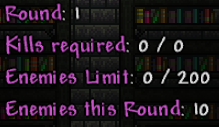
/j z -r)- Zombies spawn quickly, with a cap of 200
- You must kill x number of zombies before a time limit runs out
- Teammates will not automatically revive when the wave ends.
- Some mobs are changed out/added, such as ice slimes instead of granite elementals or desert spirits
- Otherwise, you will lose.
-
Hardcore Rapid (
/j z -hc -r)- Combination of both modes
- Has a 4x XP multiplier and 1.5x DP multiplier
- Not accessible via the pool. Only through this command.
Unlocking abilities
Telekinesis
Gives you to ability to dash left, right, up, and push/pull enemies away/towards you. The strength of the dash and push/pull increase per 3 rounds. See here for more details: Zombies Abilities
Obtaining crew. See here for instructions on obtaining crew: How to Verify (become Crew) [Step by Step]
Wish
Gambling. See here for the actual details: Zombies Abilities
Reaching r16 on Shadow’s Descent. See this guide for tips: Guide to Shadow's Descent (Zombies map/Gamemodes)
Valiant
Gain buffs/debuffs based on enemy distance. See here for details: Zombies Abilities
Reaching r12 without taking damage with the coward ability equipped. See here for an easy way to obtain this: Easy guide to unlock valiant ability
Challenge maps
Most vote-only maps are either challenging, or just old.
Notorious maps for difficulty are the following:
- Shadow’s Descent (Guide to Shadow's Descent (Zombies map/Gamemodes))
- Miner’s Deceit
- Crimson Veins
- Shadow’s Realm of Death
- Magmatic Depths
Many of the vote only maps are fairly unique, so give all of them a try!
Click here for the maps
- Beach House
- bewitched
- Catacombs
- Cosmic Collapse
- Crimson Veins
- Cryptic Castle
- Crystal Caverns
- Cyber Complex
- Dark Shadows
- Death House
- Devil’s Reservoir
- Evergrowth
- Hell Storage
- Hill House
- Magmatic Depths
- Miner’s Deceit
- Monster Mansion
- Shadow’s Descent
- Shadow’s Realm of Death
- The Ascension
- The Beast
- Topaz Mall
- Winter’s Scream
Patreon
Patreon costs REAL money(around $7.50 usd per month), and is a way of supporting the developers, as they pay for the server out of their own pocket. As an incentive, patreon unlocks two things in zombies, as well as reduced anti-spam serverwide and join/leave messages.
Reverent
- A special ability that can heal teammates at high speed- but not for too long or it’ll start damaging them!
Custom and private lobbies
Custom
/j z -cwith optional-ror-hc- Custom lobbies allow you to explore maps(
/map tp), use the god powers ability(infinite score and 32000hp), as well as skip rounds(/skiptoround <#>) and select maps(/map select <map name>. Use/startto start the match. Use/stopto terminate the match. - dp and xp gain is frozen in custom lobbies
- Please empty the lobbies if you must leave, especially if there are several lobbies running. The
 has access to
 /kick.
Private
/j z -pwith optional-ror-hc- A regular lobby, but can only be joined by receiving an invite from the
-c has precedence over -p, so a lobby with /j z -p -c -hc -r is a hardcore, rapid, custom lobby. The -p will have no effect as a custom lobby is inherently private.
Map creation
Map submission generally takes a few months, with the shortest being about a month. However, you can take as much time as you want, so long as it’s reasonable.
See here for instructions: How to Create a Zombies Map