Last updated: 11.28.2026
Last checked: 11.28.2026
Dark Gaming’s Survival Dimension has several changes compared to vanilla Terraria to accommodate for larger player counts as well as the fact that players can come and go freely. This guide covers those changes and assumes you are familiar with the base mechanics and progression of Terraria.
Joining
In order to join the Survival at all you need to register an account in Rift, the starting Dimension with the pads to teleport to other places on the server. Type /register for further instructions.
If you are told to wait a specified amount of time, wait. Usually this is because you recently joined the server for the first time and the wait period is to act as a mild filter for the cheating problem this server has. You do not need to be online for the timer to count down and Survival is the only experience that requires an account. Everything else on Dark Gaming can be played without registering.
Console?
Both Xbox and Playstation platforms currently appear to be experiencing issues with joining Survival and immediately get banned by a false flag from one of the server’s systems. If this happens to you and you’re reading this, file a ban appeal and we’ll get it fixed while we’re figuring out the problem. Sorry that you can’t join for now.
Starting Inventory
When joining Survival your character’s main inventory is replaced with your inventory for Survival only. Bringing in external items with or without cheats or exploits is not allowed, you must obtain items through normal Terraria play and progression.
By default, players start with copper tools, 15 Cross Grave Markers, and 2 Demon Hearts. The Demon Heart accessory slot is available to use immediately if your character’s normal inventory had it available, otherwise you can use one of the Demon Hearts you spawn with to get it.
Cross Grave Markers are given because players don’t drop any tombstones on death. Use these to create a Graveyard biome if you need one for anything.
Players may also start with vanity items obtained through the Trading System website.
Terrain Generation
The Basics
Currently, automatic world generation is based on Terraria version 1.4.5.6. This means a few items and structures from later versions will not generate naturally:
 Poison Barb (surface chest loot)
 Glacier Fang (underground snow chest loot)
 Silver Bracer (Dungeon gold chest loot)
Call a Survival Manager or Admin (usually @Tru3thful) if you’re looking for one of these items at the respective stage of progression.
The world also has the drunk seed flag turned on by default so that the “main” world evil changes each in - game day. This does not affect whatever evil is naturally present in the world, but it does affect a few notable things like NPC shops, drops related to a few bosses, and which evil Biome Mimic players can spawn manually.
If you dislike the Terraria Otherworld music and the Party Girl is not alive in Survival, you can go to Items and talk to her there. In all other Dimensions you will have the Otherworld music, but in Survival you should have the normal music.
Hardmode and Hardmode Debasing
After the Wall of Flesh is defeated and Hardmode starts, it has its own counter based on enemy kills. This counter can be viewed with the command /hardmodeinfo. As it lowers from the deaths of any enemies, a system message periodically warns that Hardmode is debasing. Once the counter reaches 0, a final message notes that Hardmode has debased.
At this point, Hardmode and all its effects on the world are disabled, and the Wall of Flesh must be defeated again in order to reactivate Hardmode. Doing so will trigger all effects of starting Hardmode again, notably this includes a fresh instance of the Hardmode biome V conversion. The conversion can include either evil biome depending on whichever one was active on the day the Wall of Flesh was defeated. Pots and Life Crystals will also spawn on empty flat surfaces anywhere below the surface.
Hardmode block content is not removed from the world when Hardmode debases. It only includes external things like mob spawns and their drops, NPC shops, and other things that only generate/change during Hardmode.
Special Worlds
Special world seeds, including custom built worlds made either by the staff or by the community will be announced ahead of time in the Survival News category: News > Survival
These worlds may have different features or loot following a specific theme. However because they need to be built manually, they are rare to happen.
World Regeneration
Every 12 hours, the world “regenerates,” this is commonly referred to as a “regen.” This is warned by periodic system messages in chat starting at 10(?) minutes before a world regeneration and the exact time can be checked at any time with the command /worldregen time.
When the world regenerates:
- The world is generated from scratch on the same seed. Typically this also changes to whatever world evil was not present in the world naturally (e.g. if on a given world regen the Crimson naturally generated in the world, the next world regen will have the Corruption)
- All boss progression is reset
-
- Hardmode is disabled if it was active
- Player progression and items are not reset
- Spawn platform and housing claims are not reset
In simple terms, every 12 hours the world resets, but your character and any player housing do not. This is used to ensure that the world isn’t completely looted and players can have a chance to explore the world and/or catch up.
World Reset
Once a week, the world is completely reset, this is commonly referred to as a “cycle” in addition to “reset.” Just like world regeneration the exact time until the next reset can be viewed with the command /worldregen time.
When the world resets and a new cycle begins:
- A new world is generated from scratch with a different seed
- All boss progression is reset
- Player progression and items are reset
- Spawn platform and housing claims are reset
In simple terms, the entire game resets once a week. The exact time can be viewed on the forums, in your timezone, with this event listing:
As well as with the event on the Discord server:
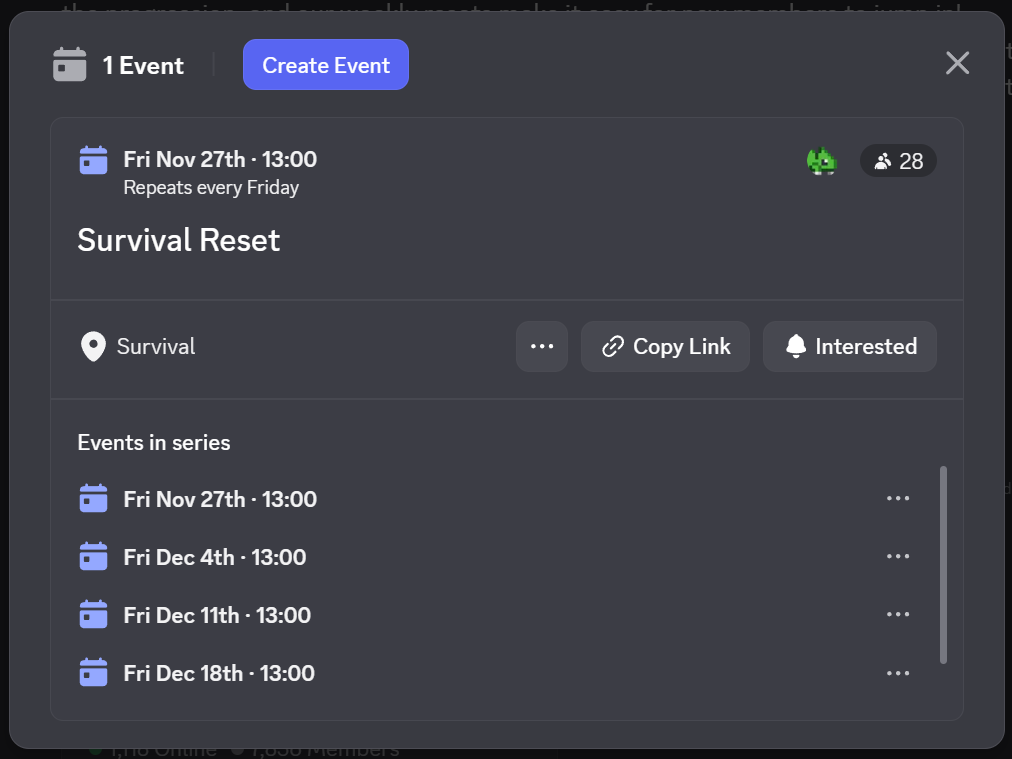
Note that the time may be off by an hour because of Daylight Savings.
World Points of Interest
World Spawn
The world spawn point is moved to a large floating area centered in the world, commonly referred to as the “spawn platform”:
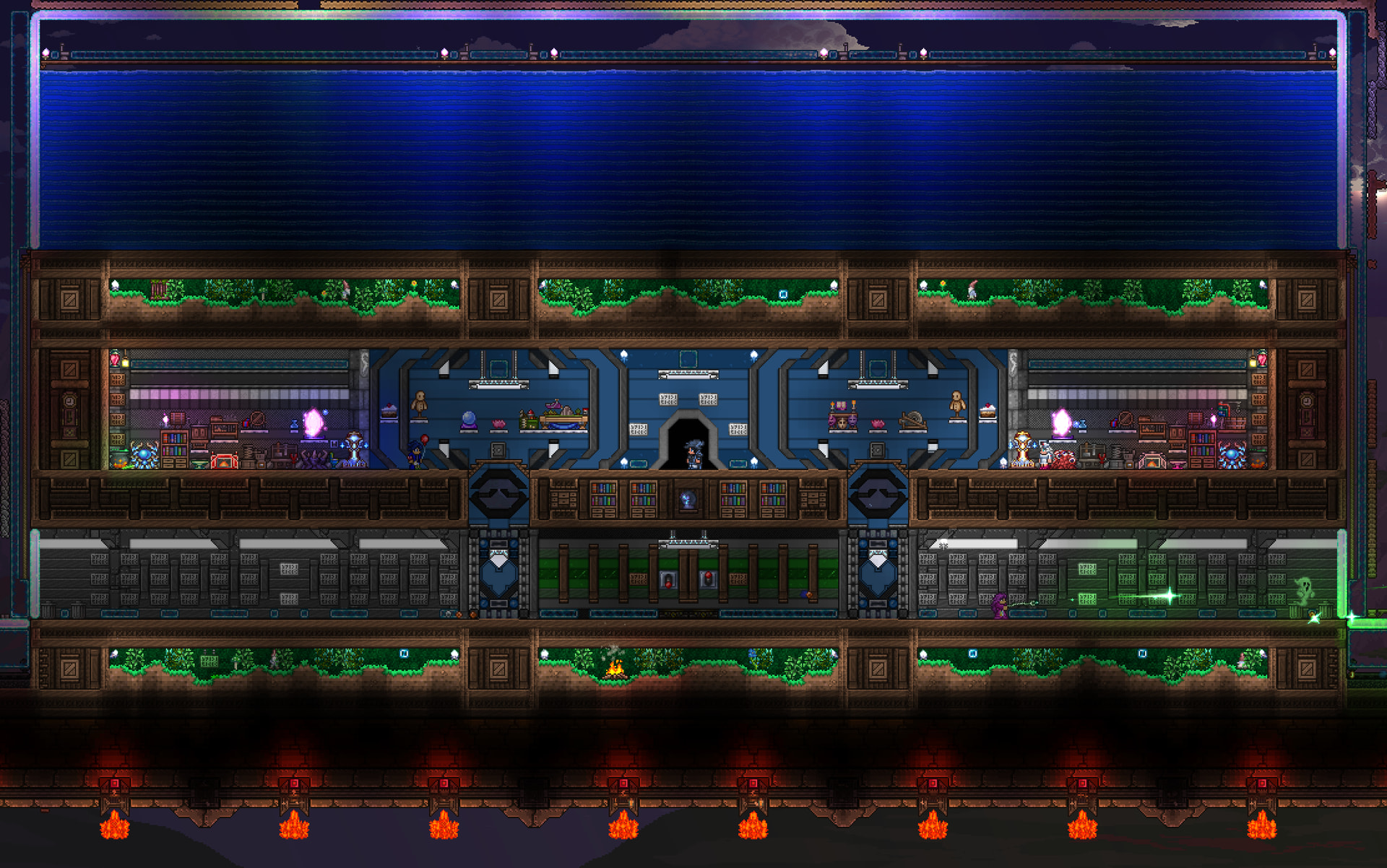
On the upper row, most crafting stations are available as well as personal storage and class buff stations to use at any time. The lower row contains community trash bins as well as signs describing Survival challenges, more information on them can be found here for when you’re really bored:
Above the immediate spawn area is a large water pool which can be fished in. This should always be high enough to count as a sky lake. Use the command /warp tops to get up here quickly.
Besides the main hub, the spawn platforms extend out horizontally. Any space above the bubble blocks can be built in and housing claims can be made, separate and safe from the world regeneration every 12 hours. Use this space to make your base and add additional storage, since chests can only be placed in housing claims:
Green area is free reign for building:
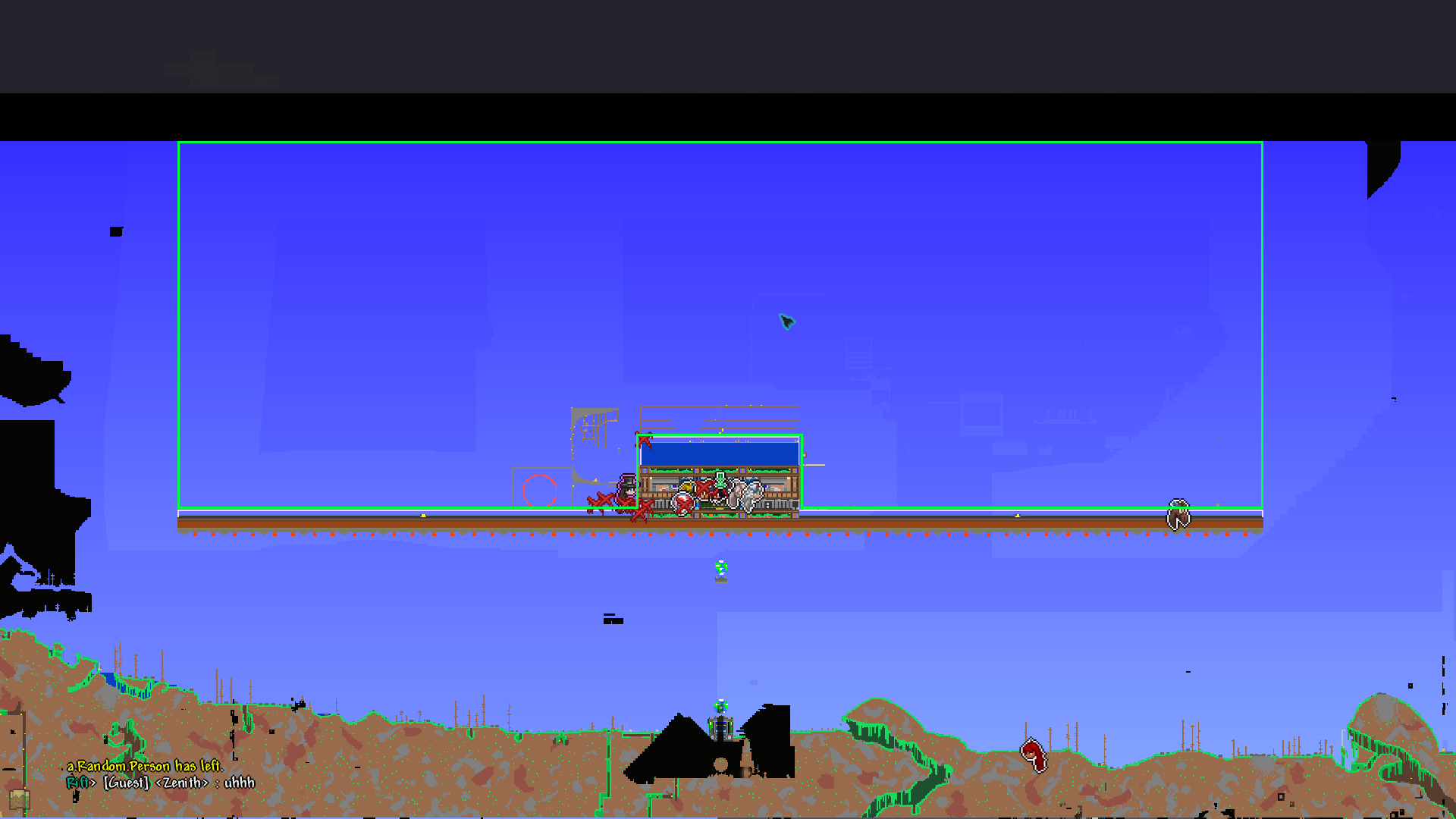
For details on creating claims, refer to the commands section.
Shimmer
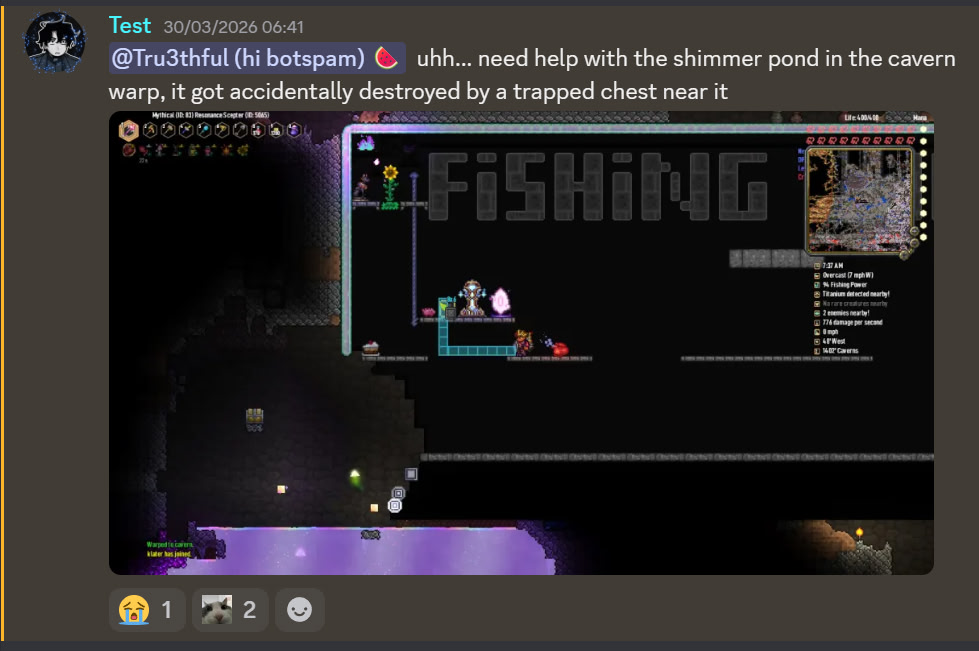
In addition to the natural Aether biome there is also a permanent Shimmer structure that can be accessed easily with warp commands. Using /warp, setting the location as shimmer, underground, or cavern will take you there:
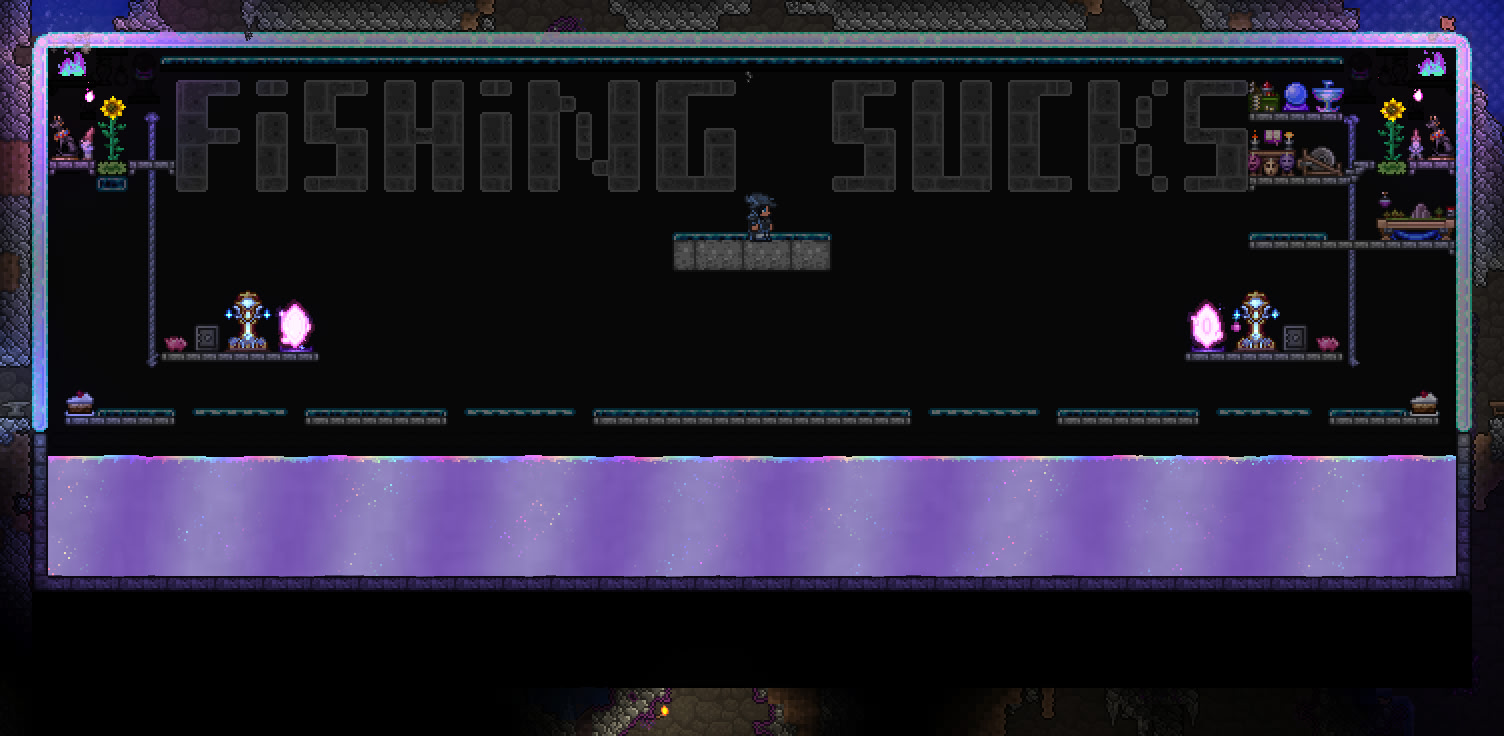
Class buff stations and personal storage are here as well as a sink next to the Crystal Ball so players can make Water Candles.
Note that this may be partially broken if the world generates a trap with Explosives too close to the boundaries. If it is broken, call a Survival Manager or Admin (usually @Tru3thful) so they can fix it at a later date.
Progression
For the most part, game progression plays out the same as vanilla Terraria in terms of boss and world unlocks, just much faster especially if more active and/or skilled players are playing during a cycle. However, there are still some changes in order to make things either a little slower or just more interesting.
Bosses
Boss progression follows the same order as vanilla Terraria; their loot and what defeating each boss unlocks also remains the same. To make sure that the progression doesn’t go too quickly however, bosses have a strength stat that increases their health and damage (the latter is apparently broken though) the earlier it is in the week in addition to any buffs from multiplayer scaling. The current list can be found here:
| Boss | Base Difficulty | Time For Nerf | Is affected by Anti-Rush? |
|---|---|---|---|
King Slime  |
1.0 | - | - |
Eye of Cthulhu  |
1.0 | - | - |
Deerclops  |
0.8 | 6 hours | - |
Eater of Worlds  |
1.0 | 1 day | - |
Brain of Cthulhu  |
1.0 | 1 day | - |
Queen Bee  |
1.0 | 1 day 6 hours | - |
Skeletron  |
0.9 | 1 day 12 hours | - |
Wall of Flesh  |
1.2 | 2 days | Yes |
Queen Slime  |
1.0 | 2 days | - |
Destroyer  |
1.0 | 2 days 12 hours | - |
Twins   |
1.0 | 2 days 18 hours | - |
Skeletron Prime  |
1.0 | 3 days | - |
Duke Fishron  |
1.4 | 3 days | - |
Plantera  |
1.2 | 3 days and 6 hours | Yes |
Empress of Light  |
1.0 | 3 days 12 hours | - |
Golem  |
1.2 | 4 days 12 hours | Yes |
Lunatic Cultist  |
1.2 | 5 days 9 hours | - |
Moon Lord  |
1.0 | 5 days 12 hours | - |
Take special note of the “Anti - Rush” column. If a boss is affected by Anti - Rush, they cannot be spawned at all until their strength stat reaches 1.4 or lower. The strength of all bosses in the current cycle can be viewed with the command /strength.
If the progression changes, it will be announced in a news post similar to the last time it was updated.
Summoning
In order to spawn bosses and invasions, you must have the Crew upgrade on your DTP account. Log in on the Trading System website and follow the instructions: https://dtp.dark-gaming.com
Some bosses also have additional changes to make them more threatening:
Boss Changes
Wall of Flesh
- Can be summoned by any player as long as the Guide is alive, Crew is not required. Spawning still follows standard rules
The Destroyer
- Any segment contact damage inflicts Electrified for 1 second
- Probe contact damage inflicts Electrified for 1 second
The Twins
- Contact damage with both bosses inflicts Broken Armor for ? seconds and Withered Armor for ? seconds
-
- Both of these are debuffs that decrease your defense by 50%, however they stack multiplicatively so you only lose 75% of your defense instead of all of it
Skeletron Prime
- Prime Cannon fires Boulders instead of bombs
- Prime Laser fires Lost Souls (Ragged Caster projectile that has loose homing and inflicts Blackout) instead of Death Lasers
- Contact damage with both head and arms inflicts Broken Armor for ? seconds and Withered Armor for ? seconds
Duke Fishron
- Duke Fishron spawns Flow Invaders (Stardust Pillar enemy) instead of Detonating Bubbles. This will be reviewed and likely changed at some undetermined point in the future.
Empress of Light
- Cannot be summoned by Prismatic Lacewing deaths. Capture the Lacewing with a net and use the command
/summoneolinstead, followed by/yesas the chat prompt tells you to
Golem
- Lihzahrd Altars are accessible on both sides of the spawn platform in case the Altar that generated with the world is missing
- Body and fist contact damage inflict Burning for 5 seconds and Withered Weapon for 20 seconds
-
- Note that the Burning infliction bypasses immunities. Obsidian Skull (+upgrades) and Obsidian Skin Potion will not save you here
Other NPC Changes
There’s also a few other changes related to different NPCs on the server, both the friendly vendors as well as spawned mobs.
List of changes
All Town NPCs
- Crew is required to reassign housing for any NPCs
Goblin Tinkerer 
- Reforging in his menu is not supported. Hold the item you want to reforge and use the commands
/reforgeand/reforgecostinstead
Traveling Merchant 
- Has a 50% chance to arrive at 12:00 A.M. every day. Requirements for selling any specific item are still vanilla
Princess 
- Can arrive at any time for some reason
Spike Ball (Dungeon trap enemy)
- Should never spawn
Most pre - Hardmode Underworld enemies
- Have increased contact damage (unless that’s also bugged like boss strength scaling)
Frost Legion
- Disabled because the Snow Globe item to summon them is itembanned
-
- The snow blocks they throw get in the way of spawn and because they’re annoying to keep cleaning up the entire event is banned. Unfortunately this means all content related to defeating them is unavailable
-
- An Admin may spawn the Santa Claus NPC when the event would naturally be active
Prismatic Lacewing
- If killed, respawns in place instantly without summoning the Empress of Light. See the Boss Changes and Commands sections for how to use Lacewings to summon the boss
Commands
Survival has many unique commands that can be used by typing them in chat. They provide useful information and utilities to help with the large - scale multiplayer experience.
/warp 
- Full syntax:
/warp (location)or/warp list
Teleports you to the set location. list shows all warps in the world.
List of warps
spawn
Teleports you to the center of the spawn platform. Can also be accessed by typing /spawn.
tops
Teleports you to the top of the spawn lake.
surface
Teleports you to the surface at the center of the world. The teleporters directly below spawn should also take you there when standing on them and flicking the lever.
locean and rocean
Teleports you to the left and right ocean respectively.
snow and tundra
Teleports you to the snow biome, usually underground.
jungle
Teleports you to the jungle biome, usually underground.
shimmer, underground and cavern
Teleports you to the shimmer structure underground at the center of the world.
hell, lhell, and rhell
Teleports you to the center, left, and right areas of the Underworld layer. Unfortunately they may be covered in blocks, lava, or both, so be careful.
dungeon
Teleports you to the Dungeon in the world. Note that you may spawn in the air but you should never be taking fall damage.
Manually placed warps
There are also a few warps placed manually around the world. Unlike all the other warps these are not updated automatically, which means they may teleport you to the wrong place until they are fixed. This is typically done an hour and half or more after a new reset by a Survival Manager or Admin (usually @Tru3thful currently).
snowsurface and tundrasurface
Teleports you to the surface of the snow biome.
junglesurface
Teleports you to the surface of the jungle biome.
lhelledge and rhelledge
Teleports you high up in the Underworld layer roughly two screens away from the left and right edge of the world respectively. Use in place of lhell and rhell if their automatic locations are unliveable or if they are far from the world edge.
/tpnpc
- Full syntax:
/tpnpc (NPC name)
Teleports you to the selected town NPC. Specify their profession and not their actual name (e.g. for a Guide named “Brett”, use guide instead of brett or brett the guide). Does nothing if the selected town NPC is not alive. Does not work on Town Pets.
/strength 
- Full syntax:
/strength
Shows the strength stat of all bosses and time until they reach their Base Difficulty strength.
/bossinfo
- Full syntax:
/bossinfo
Shows the kill status of every boss and miniboss in the current regen: either “Undefeated” in green or “Defeated” in red.
/hardmodeinfo 
- Full syntax:
/hardmodeinfo
Shows the Hardmode kill count.
/house 
Parent command for many things related to region claims. Claims only work above the spawn platform.
All of these subcommands require you to have logged in on the Trading System website at least once: https://dtp.dark-gaming.com
/house define (name)
Creates a housing region with the specified name. To “mark” the points, make any change to tiles. A box will be made using the two tiles as corners, and anything inside will be part of the claim. In addition to preventing other players from directly building there you may also place chests in them.
All players can own up to 2 housing claims simultaneously. The maximum size of a single claim is 2024 tiles. Claims have a minimum width and height of 5 tiles.
/house redefine (name) (new name)
Renames the housing region specified in name to the name set in new name.
/house delete (name)
Deletes the specified housing claim if you own it.
/house allow (add/del) (player name) (house name)
Changes the specified player’s ability to interact with the housing claim, e.g. place tiles and open chests.
addallows them to access the claim. The player must be standing within the claim when running the command.delremoves them from the claim.
/house clear
Ends the house claiming process from /house define without creating a claim. Removes the first selected point if you set it.
/house list
Lists all house claims made by any player during the reset.
/house info (name)
Displays players added to a specified housing claim and when the owner was last online, if they are offline. Typing /house info on its own will show this information for whichever house you are standing in.
/reforge 
Reforges the item in your hand. The Goblin Tinkerer’s Reforge menu does not work, use this to reforge items instead. Does nothing if the Goblin Tinkerer is not alive.
Note that using this command will remove the favorite status from all items in your inventory.
/reforgecost 
Displays the money cost to reforge the item in your hand as well as how much money you have in personal storage.
/startrain 
- Requires the corresponding Command Item equipped on the Trading System
Immediately starts Rain in the world. Has a 30 minute cooldown which is shared between all players.
Note that the Lantern Night event blocks Rain. If /startrain is used during a Lantern Night, the global cooldown starts even though the Lantern Night takes priority over Rain.
/startwind 
- Requires the corresponding Command Item equipped on the Trading System
Immediately starts Wind in the world. Has a 24 minute cooldown which is shared between all players. Cannot be used if it is actively raining. If you want both Wind and Rain, use /startwind first.
/summoneol
Consumes 1 Prismatic Lacewing from your inventory to summon the Empress of Light. Critter releasing is not supported so you must do it this way.
/worlddata
Shows miscellaneous information about the world.
Other Changes
A few other things that you may notice throughout your time playing.
Banned Items 
Some items are banned for use on the server, and you will be frozen for attempting to use them. An incomplete list is as follows:
- Bast Statue
 - Banned because of the glitches discovered in 1.4.4 which had potential to give any item in the game as well as other things. This can probably be unbanned now that the glitch is patched
- Dynamite
 - Banned because of larger scale griefing potential
- Many sources for placing lava - Banned because it’s annoying to clean up and dangerous on its own
Item Anticheat 
TrueSSC, informally known as “anticheat,” is a specialized plugin used for Survival to help with moderation since it’s comically easy to hack in Terraria. TrueSSC specifically focuses on item drops and their sources to make sure the way that items come up is correct and not cheated, such as crafting items from nothing which was very common before it was implemented. It does not do anything else that the term “anticheat” would suggest like preventing godmode or damage cheats.
Because it’s trying to verify almost everything tied to character data, there are several things that are a bit jank or are straight up broken on the server that you may notice. In no particular order:
- Lava doesn’t consistently destroy Gray and White rarity items on the server side which may lead to “ghost items” that the server sees you as trying to pick up, but don’t exist on your side which can make interacting with the world very annoying
- Attempting to sell items to an NPC that is too happy will fail
- Using Smart Cursor to place stairs will not sync server side. When reloading the area they will be flat platforms
- Aether Platforms cause major item desync with items falling through them
- Large amounts of item pickups (i.e. pile of various items) may result in taking a very long time to pick up everything and/or desynced stack sizes
-
- Boss Treasure Bags tend to be prone to this issue and in the event this happens with them, they often fail to be able to be picked up. You may call an Admin (usually @Tru3thful) to spawn a replacement for you
- Placing blocks and picking up other items simultaneously is unreliable at best and often creates client side blocks
- Gaining the Honey buff from any source sometimes deletes all active buffs on your character
- Creation of Poo is currently unsupported
- Axe of Regrowth does not replant trees server side
- Paint Sprayer and upgrades do not function. Painting with manual tools works fine
- Echo and Illuminant Coatings are unsupported
- Thrown Powders do not affect blocks server side
- Guide’s crafting help menu creates a duplicate ghost item of whatever you put in. The item will reappear on your cursor or in its original item slot after a short time, and the ghost item will stay in the help slot until you close the dialogue box
- Many grab bag type items are not updated, either for new item drops or old items being added to them in updates:
-
- Wooden Crate: Poison Barb
-
- Frozen Crate: Glacier Fang
-
- Golden Lock Box: Ram Rune, Silver Bracer
-
- Obsidian Crate: Hellstone, Hellstone Bar, Hellforge
-
- Duke Fishron Treasure Bag: Kraken
- Character loadouts are not supported. Switching loadouts will immediately kick you from the server
- Rope coils and variants don’t place rope server side
- Enemy inflicted debuffs unique to OOA remove all your buffs when they would be applied
- Disconnecting while holding an item on your cursor slot will delete it when rejoining
- Torch God event does not reward Torch God’s Favor
- Some tracks cannot be recorded with Music Boxes (both Torch God ones for example)
- Picking up liquid with a single bucket is unreliable
- Mobile/console only: crafting, buying from NPC shops, and dragging items in your inventory may be unreliable
-
- Unfortunately this is one that cannot be fixed server side without game updates. Many of these problems are because when holding to pick up a stack, etc., you use the “hand” item slot that, on PC platforms is the item held and used from your cursor. As of 1.4.5, mobile does not send any information about this item slot to the server, which ruins TrueSSC functionality. Console is included here because it is based on the mobile version